To use this site, please enable javascript
To use this site, please enable javascript
This latest release introduces three major new capabilities across the NaviSuite software suite, plus a wide range of additional performance improvements and fixes:
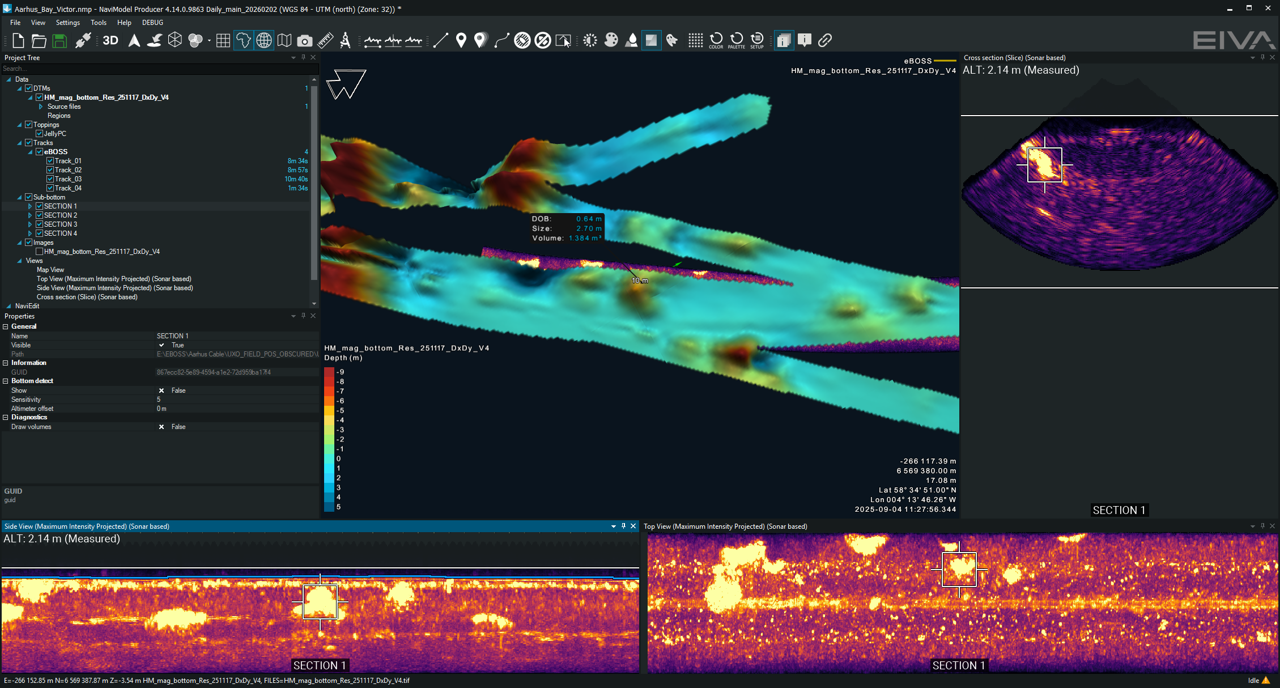
eBOSS sub-bottom data in NaviModel Producer 4.14, with a detected target profiled in 3D and cross-checked against side and top sonar views.
With this new update to NaviSuite comes a complete workflow for EdgeTech’s Buried Object Sonar System (eBOSS) that streamlines everything from acquisition to modelling and final deliverables. Sub-bottom data can now be captured, visualised and processed without leaving the NaviSuite environment: surveyors get a real-time view of the seabed as they sail, and processors get automatic seabed referencing, transparent 3D point clouds for spotting targets, and ready-to-export depth of cable plots and UXO deliverables – all within tools they already know.
For NaviPac Pro users: Helmsman now connects directly to the EdgeTech Beamformer. You can start and stop pinging and logging from the Helmsman toolbar, follow the survey with a real-time swath view and real-time coverage DTMs placed at the seabed depth and coloured with the maximum intensity projected from the sediment pile being built while you survey.
NaviModel Producer now picks up the same data to complete processing, with cable and UXO digitisation on any profile view and export-ready collections for handover. Note that cable digitisation requires the 3D pipe option for NaviModel Producer; the standard NaviModel Producer licence covers everything else, with NaviModel Analyser and Viewer available as read-only.
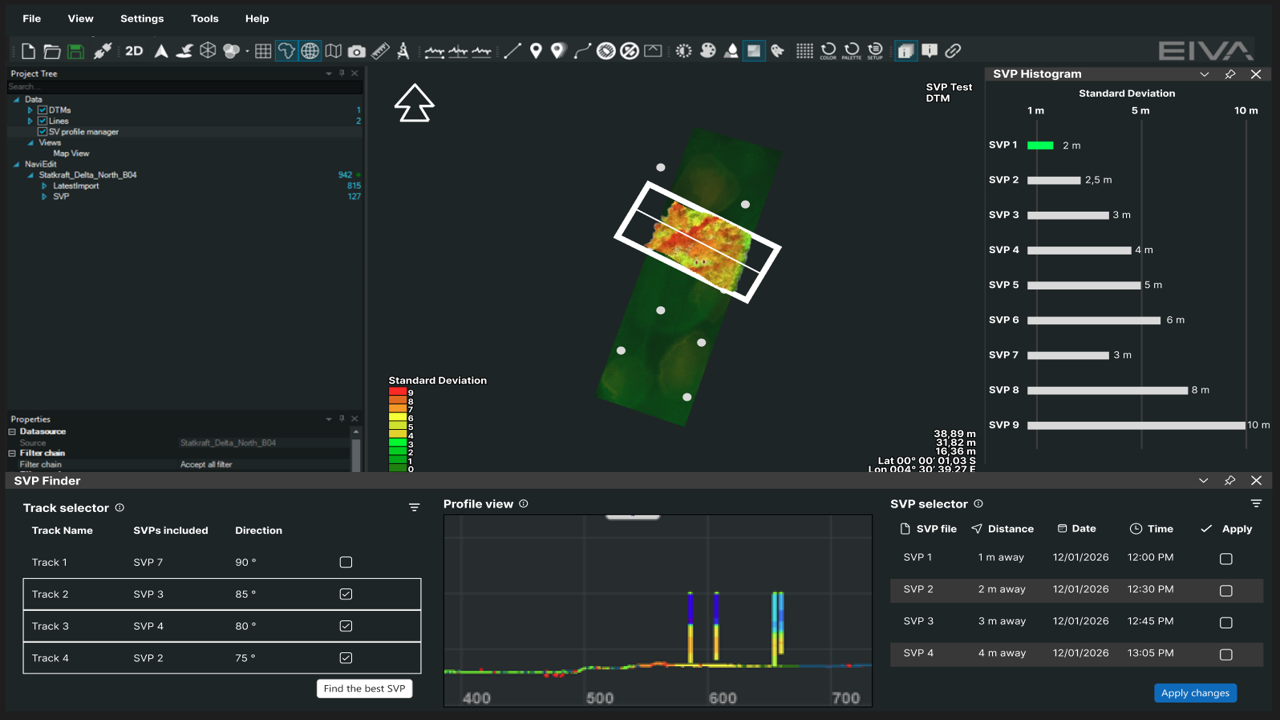
The SVP Toolbox in NaviModel Producer 4.14, ranking candidate sound velocity profiles by standard deviation and previewing the best match before it's applied.
The new SVP Toolbox in NaviModel Producer takes on one of the most common causes of poor bathymetric results: an incorrect sound velocity profile (SVP), which introduces ray-bending errors into the multibeam XYZ calculation and shows up on the seabed as ‘smiley’ or ‘frowny’ patterns. Instead of switching between tools and testing profiles one at a time, the toolbox automatically ranks every candidate profile and highlights the best match, turning a correction that could take hours into a task measured in minutes.
The SVP Toolbox helps users identify the optimal SVP for a selected area by automatically scoring candidates based on standard deviation. Results can be reviewed non-destructively before being applied. Confirmed changes write back to NaviEdit automatically and update the DTM with latest changes with direct access to the Header Editor directly within the toolbox.
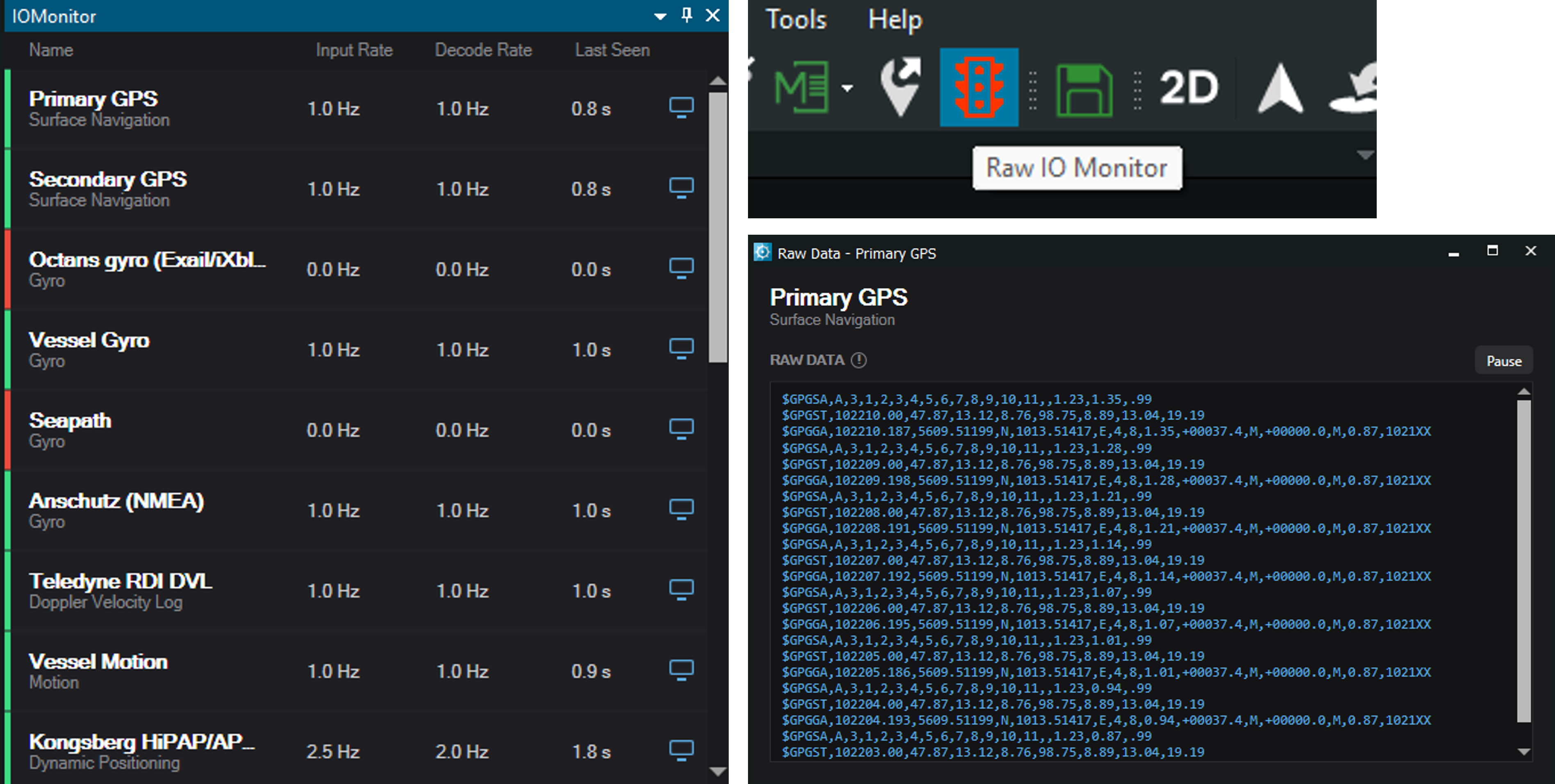
The new I/O Monitor in Helmsman 4.14: input rate, decode rate and time-since-last-data for every instrument in one colour-coded view – with the raw data feed one click away for troubleshooting.
This update to NaviPac simplifies instrument monitoring within Helmsman: a single, colour-coded view now shows the health of every sensor at a glance, so a configuration or decoding problem is obvious immediately rather than something discovered mid-survey.
The new I/O Monitor is accessible via a dedicated toolbar icon in Helmsman and shows input rate, decode rate and time-since-last-data for every configured instrument. It broadcasts over the vessel network, so the same view is available on Master and Remote Helmsman stations alike, with no need to be at the primary station to see what's happening with a sensor.
In addition to the major new capabilities, NaviSuite introduces a range of improvements across the suite, including:
Alongside this, a security update covers the browser component shared by Helmsman and NaviModel. Full details are in the release notes for each product.
Products included in this release
Ready to upgrade? Download the latest releases from the EIVA download site to explore the new eBOSS workflow, automated SVP optimisation and enhanced sensor monitoring capabilities.
Want to see how these new capabilities could fit into your subsea workflow? Contact us to discuss your NaviSuite setup.